KILTER BOARD
Looking for a Kilter Board app alternative?
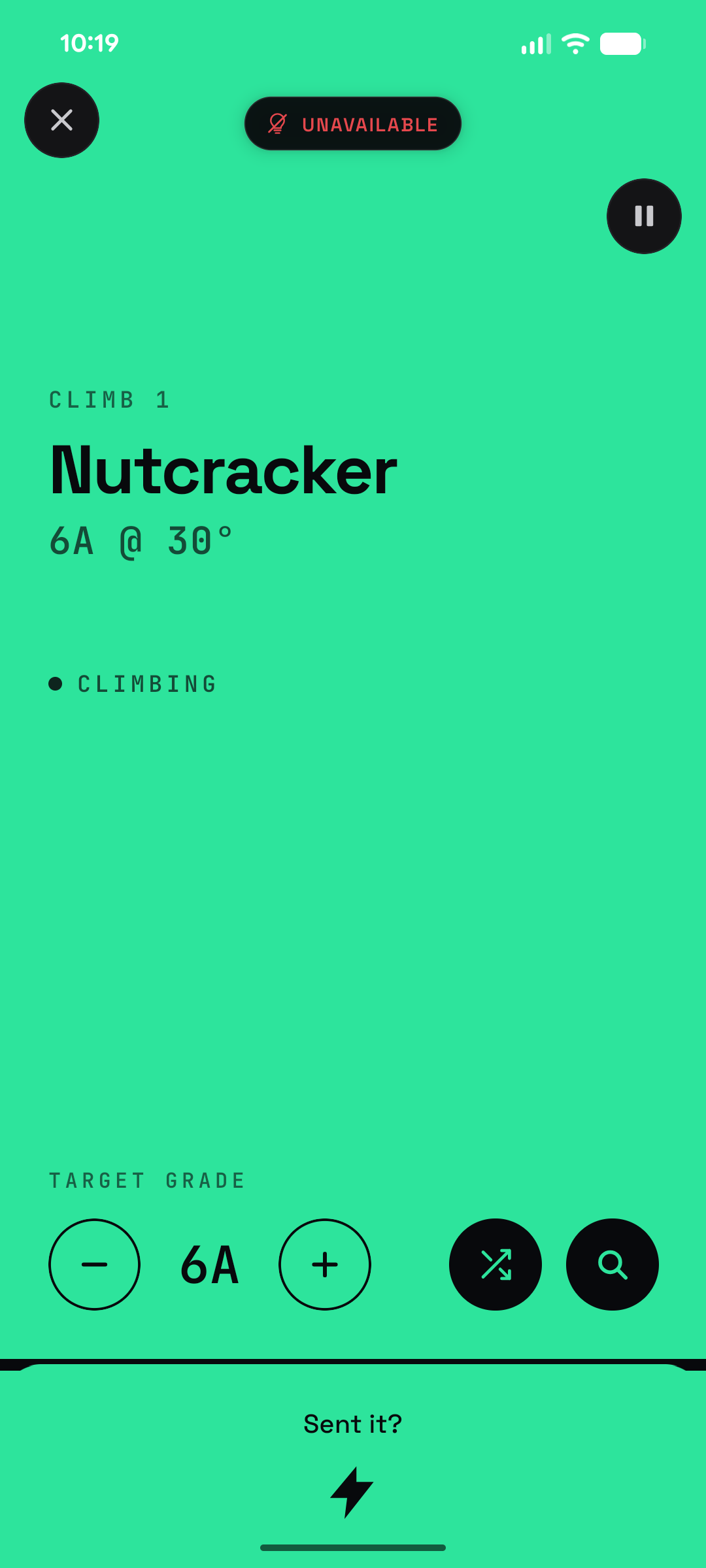
Boulder Blitz is an independent Android app for Kilter Board sessions. It picks a climb at your grade, lights it up on the board over Bluetooth, runs the clock, and scores your sends — so the session runs itself instead of you poking at a phone between attempts. It's free, it works with no signal at the wall, and it isn't a Kilter Board or Aurora Climbing product.
It drives the same board hardware
Kilter and Tension boards both run on Aurora Climbing's LED stack, and Boulder Blitz speaks to it directly: your phone holds a Bluetooth connection to the board and sends the hold colours for whichever climb it just picked. Nothing is relayed through a server, and no second device is involved. One caveat that trips people up — only one phone can hold that connection at a time, so close any other app or device already talking to the board before you connect.
What it does during a session
Picks the climb for you. Set a grade and wall angle once; every round it pulls a climb from your board's catalogue and lights it up. Shuffle if you don't fancy it, or search the catalogue by name.
Runs the clock. Three timing presets — Rapid at 60s a climb, Blitz at 30s, Bullet at 20s — with matching rest between rounds, on a full-screen timer you can read from the mat.
Keeps score. Log sends per round and get a weighted total (sends × grade), a round-by-round breakdown, and a session saved to your History and Stats.
Two-player Duel Mode. Alternate attempts against a friend on the same climb, with an optional Handicap Mode so climbers at different grades still get a fair head-to-head.
Untimed Project Mode. No clock at all — work one problem as long as you like, bump the target grade mid-session, and still have it scored into your history.
It works in the dead zone by the board
Board corners are notoriously bad for signal, which is exactly where an app that needs the network falls over. Boulder Blitz caches your board's full climb catalogue to your phone, so a session starts, picks climbs, and searches by name with no connection at all. Only signing in and the first catalogue download need the internet.
OFFLINE SESSION START
OFFLINE CLIMB SEARCH
NO ACCOUNT ON THE BOARD
What it doesn't do
Worth knowing before you install it, because Boulder Blitz is a session runner rather than a full replacement for the official app:
No climb creation or editing. You climb what's in the catalogue — setting your own problems and sharing them stays in the official app.
It doesn't write back to a Kilter logbook. Sessions are scored and stored in Boulder Blitz's own History and Stats; nothing is pushed back to Kilter.
The Kilter catalogue is a snapshot, not a live feed. Kilter's catalogue was imported once; the continuous incremental sync currently runs for the Tension Board only. Very recently set Kilter climbs may not be in the pool yet.
Android only, no web version. iOS is on the roadmap with no date yet, and a browser can't hold a Bluetooth connection to the board, so there's no desktop version planned.
Not affiliated with Kilter or Aurora. It's an independent app built to work alongside the board — see the
Terms for the full statement.
What you need to start
A Kilter Board — any layout, frame size, or angle. You pick yours on first setup.
An Android phone with Bluetooth, within a few feet of the board when connecting.
A Google sign-in. That's the whole account setup — no Kilter login, and no password of yours goes anywhere near Boulder Blitz.
Questions people ask first
Do I need a Kilter account, or the official app?
Boulder Blitz signs you in with Google and never asks for a Kilter login. It also doesn't try to be the official app — there's no climb creation and no social feed — so most people keep both installed and use Boulder Blitz for training sessions.
My phone won't pair with the board — what do I try?
Check Bluetooth is on and Boulder Blitz has Bluetooth permission (Settings → Apps → Boulder Blitz → Permissions), and stand within a few feet of the board. Because only one phone can hold the link, disconnect any other device first. If it still won't pair, forget the board in your phone's system Bluetooth settings and reconnect from inside the app.
Is it really free?
Yes — free on Google Play, no ads, no analytics SDK, no tracking, and no camera, contacts, location, or microphone permissions. The
Privacy Policy lists exactly what's stored.
Does it work on iPhone?
Not yet. Android is the only released platform, since that's what the current Bluetooth module was built for. There's no iOS date —
add your vote if you want it prioritized.
Climbing on a Tension Board instead? The app covers that board too — including a live catalogue sync and an optional logbook import.
Tension Board app alternative →